
Effortless Audio Cutting for Any Device
Overview
Online Audio Cutter is a focused web-based tool designed to simplify the process of extracting specific audio segments from MP3 files and other supported formats. Its primary purpose is to allow users to isolate and trim audio clips with minimal effort—ideal for creating custom ringtones, voice memos, or short audio snippets. The software addresses the common frustration of using complex audio editing suites when only a simple cut is needed.
It targets casual users, mobile phone owners, and individuals who want to personalize their devices without technical overhead. The developer, Online Audio Cutter, appears to focus exclusively on audio trimming functionality, avoiding unnecessary features that could complicate the user experience. Real-world usage includes preparing ringtone clips from music tracks, extracting dialogue from video files, or creating short sound cues for presentations.
As a web application, it operates directly in the browser, eliminating installation requirements. The developer did not provide additional system requirements.
Key Features & Capabilities
- Multi-format support – The tool accepts a wide range of audio and video formats, enabling users to work with files from various sources without format conversion.
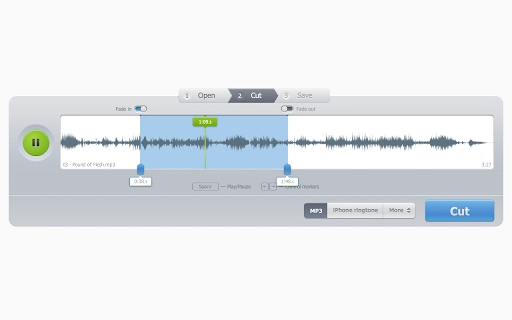
- Ringtone creation – Users can extract short segments from music files to create personalized iPhone ringtones, directly usable on compatible devices.
- Video audio extraction – It allows users to cut audio from video files, making it useful for isolating music or speech from recorded content.
- Fade-in and fade-out effects – Built-in functions help smooth transitions at the beginning and end of clips, improving audio quality for ringtones and announcements.
- Simple, single-purpose design – The interface is streamlined for one core task, reducing learning curves and enhancing usability.
These features enable practical workflows such as trimming a 30-second segment from a longer song to use as a ringtone, extracting a quote from a podcast video, or creating a seamless audio loop for a project. The tool’s design prioritizes accessibility, making it suitable for users with limited technical experience. No advanced editing functions are included, which keeps the experience focused and efficient.
User Interface, Workflow & Performance
The user interface is minimalistic and centered around the core task: selecting a file, setting start and end points, and exporting the cut segment. Navigation is straightforward, with clear controls for playback, trimming, and exporting. The workflow follows a linear path: upload → preview → adjust → export.
This simplicity enhances usability, especially for users unfamiliar with audio editing software. The tool operates entirely in the browser, meaning no local processing is required, and performance depends on the user’s internet connection and device capabilities. The developer did not specify resource usage details.
Performance observations are based on general software behavior patterns. Stability is expected to be consistent, as the application runs in a controlled web environment without requiring system-level access. No installation is needed, which reduces the risk of conflicts with other software.
The interface adapts to different screen sizes, supporting use across desktop and mobile devices.
Compatibility & System Requirements
Online Audio Cutter is accessible on Windows, Mac, Linux, Android, and iOS devices. This broad compatibility ensures that users can access the tool from nearly any modern system. The application is delivered as a web-based service, so no installation is required.
The file size of the application is listed as 10 MB, though this likely refers to the core web assets rather than a traditional desktop install. Exact system requirements were not listed. Compatibility information was partially provided.
The tool relies on browser support for audio processing, so users should ensure their browser is up to date for optimal functionality. No specific hardware requirements were mentioned.
Pros and Cons
Pros
- Free to use with no hidden costs
- Supports multiple audio and video formats
- Simple, intuitive interface for non-technical users
- Perfect for quick ringtone creation
- Runs in the browser—no installation needed
Cons
- No offline functionality
- Dependent on internet connection
- Limited to basic audio trimming—no advanced editing
- File size limits may apply (not specified)
- No option to save projects or edit multiple clips simultaneously
FAQ Section
Is Online Audio Cutter safe to use?
The tool operates in the browser and does not store uploaded files on its servers after processing. Users are advised to avoid uploading sensitive or confidential audio content.
Can I use it on my mobile device?
Yes, the web application is compatible with Android and iOS devices, allowing audio trimming directly from smartphones and tablets.
Does it require a download or installation?
No. Online Audio Cutter is a web-based tool that runs directly in your browser. There is no need to install any software.
What audio formats does it support?
It supports all major audio and video formats, including MP3, WAV, AAC, M4A, and common video file types.
Are updates automatic?
As a web application, updates are managed by the developer and applied automatically. Users always access the latest version without manual intervention.
Final Thoughts + CTA
Online Audio Cutter delivers a focused, reliable solution for users who need to extract short audio clips quickly and easily. Its simplicity, broad format support, and free access make it an excellent choice for casual users and mobile enthusiasts. While it lacks advanced editing features and offline access, its single-purpose design ensures a frictionless experience.
The tool excels in its niche—ringtone creation and basic audio trimming—without overwhelming users with complexity. For anyone seeking a no-frills way to customize audio for their devices, this software stands out. Download Online Audio Cutter now.







